
When it comes to deploying code and making it available to environments we usually go for the pattern of having a pipeline delivering it, be doing it by deploying or syncing it to a persistent storage.
So there’s a MR / PR merge into your main branch, or a new release / tag created, and then there’s a pipeline job to deliver it.
Another pattern used is the GitOps approach, where an external tool detects changes to your repository and then takes the necessary action on your deployment.
An example of this would be what Argo CD does:
- It polls the repo on intervals and then compares the live cluster state with the git state; if there’s a drift it can alert or apply changes depending on sync configs.
- The production grade approach is to use the
Argo CDwebhooks: an event happens, a push for example, it sends the event to the webhook, and then the same flow as above happens when there’s a drift.
And that’s similar to the pattern I want to present here by using the Kubernetes git-sync sidecar, but in this case it’s really a “simple” sync, as there would not be drift detection on this flow.
My experience with it goes back to when I started doing Airflow deployments to Kubernetes, where I had to make all DAG code available to several parts of the whole Airflow orchestration stack, like the webserver, scheduler, and workers, so that all flows and pipelines stayed up to date throughout all these components.
Initially I built my own version of a git-sync baked into airflow.
After a while I started using the earlier releases of the Airflow helm chart, already with an older version of this same git-sync from the Kubernetes project, deployed as a side-car container.
It completely suited our use case to have fast syncs, pulling from last pushed changes from a branch to a particular environment.
All CI/CD pipelines were anyway enforced by several rules, like linters, unit-tests and others, to guarantee a good delivery.
As an example I’ll be using a simple nginx container, and I’ll apply changes to the index.html file, but the 50x.html is part of the repo (it’s only a copy from the default one from nginx).
container"] EMPTYDIR["EmptyDir - {}"] GITSYNC["gitsync
container"] NGINX --- |Mounts| EMPTYDIR GITSYNC --- |Mounts| EMPTYDIR end end subgraph GitHub REPO["Repository"] end GITSYNC <---> |Polls/Fetch| REPO
Github fine-grained personal access token
First step is to decide on which way git-sync will connect with your repo.
There are several alternatives: ssh keys, user/passwd and others.
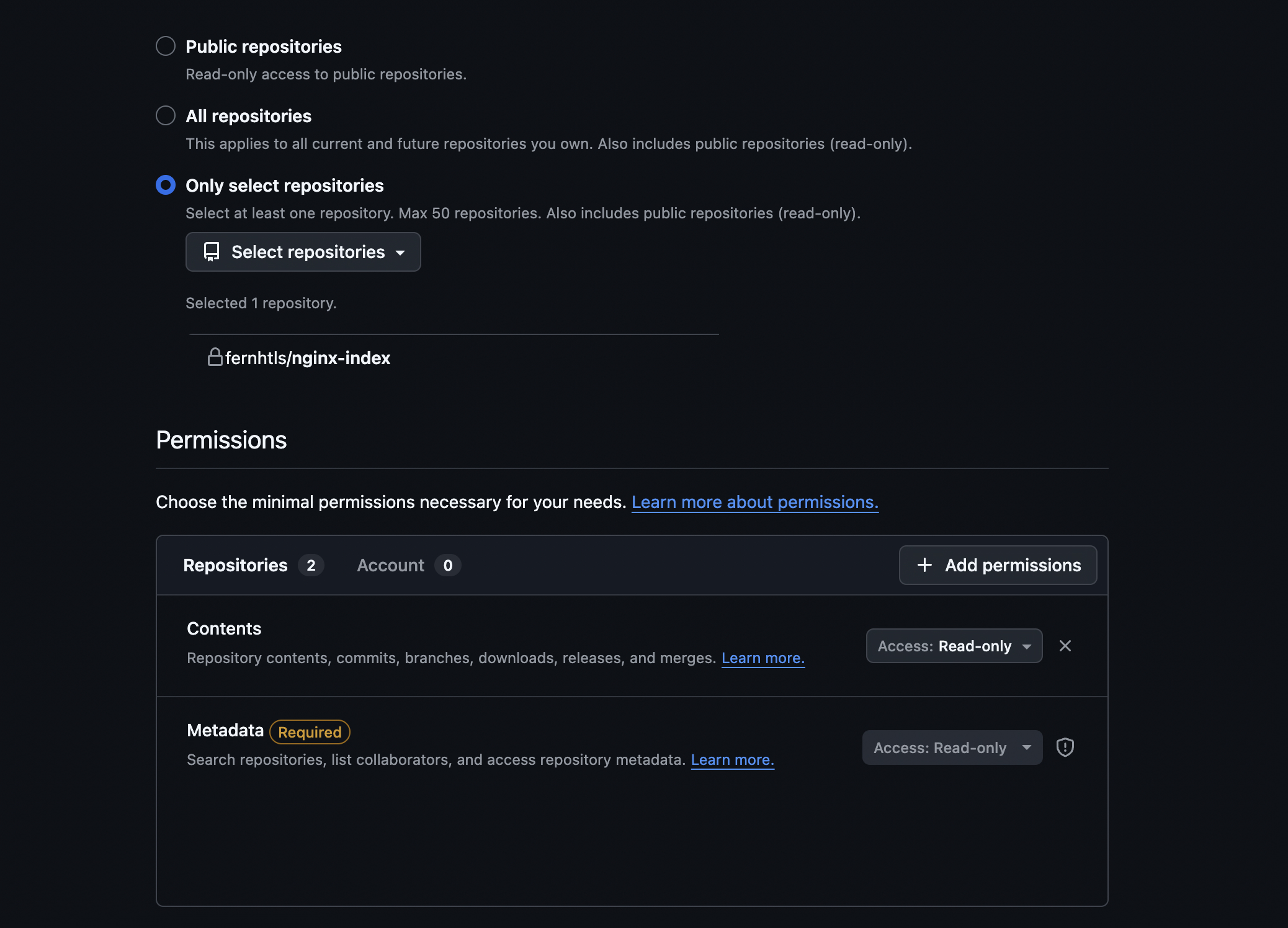
I have chosen to use a fine-grained personal token. So the actions will be using my user, but the token has fine-grained permissions.
So the the fine-grained permissions will be to access the content and metadata of a single repository, and with only read-only permissions.
How to create the fine-grained personal token in github:
-
Click on your profile picture and go to
Seetings. -
On the left you will see an option called
Developer Settings. -
On
Developer SettingsgoPersonal access tokens, and you can then create a new token with onlyContentaccessRead-Onlypermissions.
- Save the token generate, as we will be creating our
secretwith it’s content.
I’ll include in the references the github official guide as well.
Kubernetes resources
I’ll be creating three k8s objects for this implementation:
- Multi-container pod - main container with
nginxand a sidecar container with ourgit-sync. configMap- thiscmwill contain a file key / value with the contents for thenginxserver configuration (server config to change therootlocation of our static html files).secretwith thegithub fine-grained personal token.
Let’s generate first our secret (replace the <PERSONAL-TOKEN> with your own token value):
k create secret generic github-token-secret --from-literal="token=<PERSONAL-TOKEN>"
For the configMap I’ve generate the config file first, based on a pre-existing nginx default.conf (copied from the nginx image).
Here’s the file with the changes:
server {
    listen       80;
    listen  [::]:80;
    server_name  localhost;

    #access_log  /var/log/nginx/host.access.log  main;

    location / {
        root   /usr/share/nginx/html/nginx-index.git; ### ROOT CHANGED TO THE PATH FROM GIT-SYNC
        index  index.html index.htm;
    }

    #error_page  404              /404.html;

    # redirect server error pages to the static page /50x.html
    #
    error_page   500 502 503 504  /50x.html;
    location = /50x.html {
        root   /usr/share/nginx/html/nginx-index.git;
    }

    # proxy the PHP scripts to Apache listening on 127.0.0.1:80
    #
    #location ~ \.php$ {
    #    proxy_pass   http://127.0.0.1;
    #}

    # pass the PHP scripts to FastCGI server listening on 127.0.0.1:9000
    #
    #location ~ \.php$ {
    #    root           html;
    #    fastcgi_pass   127.0.0.1:9000;
    #    fastcgi_index  index.php;
    #    fastcgi_param  SCRIPT_FILENAME  /scripts$fastcgi_script_name;
    #    include        fastcgi_params;
    #}

    # deny access to .htaccess files, if Apache's document root
    # concurs with nginx's one
    #
    #location ~ /\.ht {
    #    deny  all;
    #}
}
And here’s the imperative command to create the configMap:
k create cm nginx-default-conf --from-file=./default.conf
Ps:The key for the configMap will be the file name with the imperative command, and that’s exactly what we need to mount the configMap as the file.
This configMap will be mounted on the default location for the config at the /etc/nginx/conf.d path.
And finally here’s the multi-container pod yaml:
apiVersion: v1
kind: Pod
metadata:
  labels:
    run: nginx-git-sync
  name: nginx-git-sync
spec:
  initContainers:
  - name: git-sync
    image: k8s.gcr.io/git-sync/git-sync:v4.7.0
    restartPolicy: Always # sidecar notation with initContainers
    env:
    - name: GITSYNC_REPO
      value: "https://github.com/fernhtls/nginx-index.git"
    - name: GITSYNC_REF
      value: "main"
    - name: GITSYNC_ROOT
      value: "/git"
    - name: GITSYNC_PERIOD
      value: "30s"
    - name: GITSYNC_USERNAME
      value: "fernhtls"
    - name: GITSYNC_PASSWORD
      valueFrom:
        secretKeyRef:
          name: github-token-secret
          key: token
    volumeMounts:
    - name: repo-clone
      mountPath: /git
  containers:
  - image: nginx
    name: nginx-git-sync
    volumeMounts:
    - name: repo-clone
      mountPath: /usr/share/nginx/html
    - name: nginx-default-conf
      mountPath: /etc/nginx/conf.d
    ports:
    - containerPort: 80
  volumes:
  - name: repo-clone
    emptyDir: {}
  - name: nginx-default-conf
    configMap:
      name: nginx-default-conf
  dnsPolicy: ClusterFirst
  restartPolicy: Always
I’m making use of an emptyDir, as for this example I don’t need any persistency, it can be really ephemeral and stateless, and that should not be problem as the persistent side is the github repo.
Both on Airflow and here with just a static nginx the content is reloaded automatically, so no app restart / reload, so take that into consideration as well.
As explained at the start of the post, we are using a sidecar pattern, but we could switch to a init pattern if needed, and git-sync has arguments to make it only sync once and exit.
I’ve created a new file nginx-git-sync.yaml with this content, so let’s then create our pod and follow a bit the logs:
k create -f nginx-git-sync.yaml
Let’s check the logs of both containers:
k logs -f nginx-git-sync -c nginx-git-sync
/docker-entrypoint.sh: /docker-entrypoint.d/ is not empty, will attempt to perform configuration
/docker-entrypoint.sh: Looking for shell scripts in /docker-entrypoint.d/
/docker-entrypoint.sh: Launching /docker-entrypoint.d/10-listen-on-ipv6-by-default.sh
10-listen-on-ipv6-by-default.sh: info: can not modify /etc/nginx/conf.d/default.conf (read-only file system?)
/docker-entrypoint.sh: Sourcing /docker-entrypoint.d/15-local-resolvers.envsh
/docker-entrypoint.sh: Launching /docker-entrypoint.d/20-envsubst-on-templates.sh
/docker-entrypoint.sh: Launching /docker-entrypoint.d/30-tune-worker-processes.sh
/docker-entrypoint.sh: Configuration complete; ready for start up
2026/07/13 14:41:50 [notice] 1#1: using the "epoll" event method
2026/07/13 14:41:50 [notice] 1#1: nginx/1.31.2
2026/07/13 14:41:50 [notice] 1#1: built by gcc 14.2.0 (Debian 14.2.0-19)
2026/07/13 14:41:50 [notice] 1#1: OS: Linux 6.12.13-200.fc41.aarch64
2026/07/13 14:41:50 [notice] 1#1: getrlimit(RLIMIT_NOFILE): 1048576:1048576
2026/07/13 14:41:50 [notice] 1#1: start worker processes
2026/07/13 14:41:50 [notice] 1#1: start worker process 21
2026/07/13 14:41:50 [notice] 1#1: start worker process 22
2026/07/13 14:41:50 [notice] 1#1: start worker process 23
2026/07/13 14:41:50 [notice] 1#1: start worker process 24
We can see that our nginx container started successfully.
 k logs -f nginx-git-sync -c git-sync
INFO: detected pid 1, running init handler
{"logger":"","ts":"2026-07-13 14:41:48.736508","caller":{"file":"main.go","line":646},"level":0,"msg":"starting up","version":"v4.7.0","pid":12,"uid":65533,"gid":65533,"home":"/tmp","flags":[]}
{"logger":"","ts":"2026-07-13 14:41:48.738662","caller":{"file":"main.go","line":752},"level":0,"msg":"git version","version":"git version 2.47.3"}
{"logger":"","ts":"2026-07-13 14:41:48.749794","caller":{"file":"main.go","line":1277},"level":0,"msg":"repo directory was empty or failed checks","path":"/git"}
{"logger":"","ts":"2026-07-13 14:41:48.749822","caller":{"file":"main.go","line":1287},"level":0,"msg":"initializing repo directory","path":"/git"}
{"logger":"","ts":"2026-07-13 14:41:49.594498","caller":{"file":"main.go","line":1815},"level":0,"msg":"update required","ref":"main","local":"","remote":"9383292cefcd000fb968478d4e8d2cb98fc492aa","syncCount":0}
{"logger":"","ts":"2026-07-13 14:41:49.635707","caller":{"file":"main.go","line":1861},"level":0,"msg":"updated successfully","ref":"main","remote":"9383292cefcd000fb968478d4e8d2cb98fc492aa","syncCount":1}
And git-sync has started polling from the repository.
I could not find in the documentation if we can change the structure git-sync creates for the directory, but usually your application should be able to config a root path, just like we did with the nginx config.
The way git-sync brings in new commits is branching and creating a new worktree/HEAD for syncs, and then moving symbolic links to the new worktree/HEAD.
This was implemented to avoid that any content is half synced, and your app is already loading it, generating inconsistencies and errors.
k exec -ti nginx-git-sync -c git-sync -- bash
git-sync@nginx-git-sync:~$
git-sync@nginx-git-sync:~$ ls -ltr /git
total 0
lrwxrwxrwx. 1 git-sync git-sync 51 Jul 13 14:41 nginx-index.git -> .worktrees/9383292cefcd000fb968478d4e8d2cb98fc492aa
git-sync@nginx-git-sync:~$
git-sync@nginx-git-sync:~$ ls -ltra /git
total 0
drwxr-xr-x. 1 root     root      39 Jul 13 14:41 ..
drwxr-xr-x. 3 git-sync git-sync  54 Jul 13 14:41 .worktrees
lrwxrwxrwx. 1 git-sync git-sync  51 Jul 13 14:41 nginx-index.git -> .worktrees/9383292cefcd000fb968478d4e8d2cb98fc492aa
drwxrwxrwx. 4 root     root      59 Jul 13 14:41 .
drwxr-xr-x. 9 git-sync git-sync 181 Jul 13 14:46 .git
git-sync@nginx-git-sync:~$
We can now port-foward the main container port to access locally, and open the nginx page on a browser:
k port-forward nginx-git-sync 8081:80

So we only the initial commit for now, let’s push some changes to the file and commit, and check both the logs and main page again.
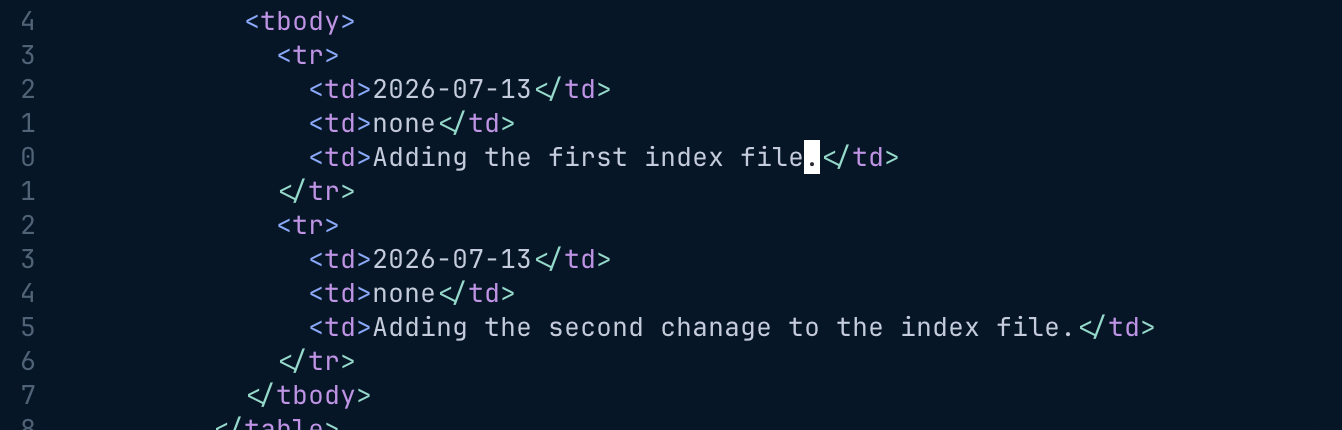
After doing the changes we can see the following at the git-sync logs:
k logs -f nginx-git-sync -c git-sync
INFO: detected pid 1, running init handler
{"logger":"","ts":"2026-07-13 14:41:48.736508","caller":{"file":"main.go","line":646},"level":0,"msg":"starting up","version":"v4.7.0","pid":12,"uid":65533,"gid":65533,"home":"/tmp","flags":[]}
{"logger":"","ts":"2026-07-13 14:41:48.738662","caller":{"file":"main.go","line":752},"level":0,"msg":"git version","version":"git version 2.47.3"}
{"logger":"","ts":"2026-07-13 14:41:48.749794","caller":{"file":"main.go","line":1277},"level":0,"msg":"repo directory was empty or failed checks","path":"/git"}
{"logger":"","ts":"2026-07-13 14:41:48.749822","caller":{"file":"main.go","line":1287},"level":0,"msg":"initializing repo directory","path":"/git"}
{"logger":"","ts":"2026-07-13 14:41:49.594498","caller":{"file":"main.go","line":1815},"level":0,"msg":"update required","ref":"main","local":"","remote":"9383292cefcd000fb968478d4e8d2cb98fc492aa","syncCount":0}
{"logger":"","ts":"2026-07-13 14:41:49.635707","caller":{"file":"main.go","line":1861},"level":0,"msg":"updated successfully","ref":"main","remote":"9383292cefcd000fb968478d4e8d2cb98fc492aa","syncCount":1}
{"logger":"","ts":"2026-07-13 14:58:50.167080","caller":{"file":"main.go","line":1815},"level":0,"msg":"update required","ref":"main","local":"9383292cefcd000fb968478d4e8d2cb98fc492aa","remote":"40d1db7d743fa1c841d1ffac4b1a13a258779f89","syncCount":1}
{"logger":"","ts":"2026-07-13 14:58:50.204358","caller":{"file":"main.go","line":1861},"level":0,"msg":"updated successfully","ref":"main","remote":"40d1db7d743fa1c841d1ffac4b1a13a258779f89","syncCount":2}
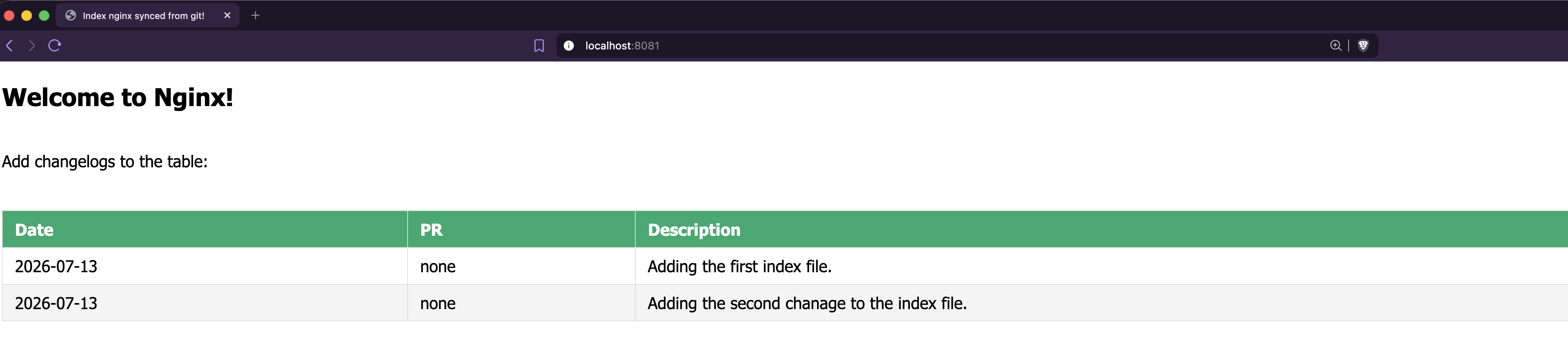
We can see a new update required and the git-sync bringing in the new content.
Let’s check the page again to see the new content:
And finally we can see the changes on git-sync wit the new symlinks and worktree:
k exec -ti nginx-git-sync -c git-sync -- bash
git-sync@nginx-git-sync:~$
git-sync@nginx-git-sync:~$ cd /git
git-sync@nginx-git-sync:/git$
git-sync@nginx-git-sync:/git$ ls -ltr
total 0
lrwxrwxrwx. 1 git-sync git-sync 51 Jul 13 14:58 nginx-index.git -> .worktrees/40d1db7d743fa1c841d1ffac4b1a13a258779f89
git-sync@nginx-git-sync:/git$
git-sync@nginx-git-sync:/git$ ls -la .worktrees/
total 0
drwxr-xr-x. 3 git-sync git-sync 54 Jul 13 14:58 .
drwxrwxrwx. 4 root     root     59 Jul 13 14:58 ..
drwxr-xr-x. 2 git-sync git-sync 69 Jul 13 14:58 40d1db7d743fa1c841d1ffac4b1a13a258779f89
git-sync@nginx-git-sync:/git$
Conclusion
Git-sync sidecar is an standard nowadays. Even though it’s not a silver bullet that serves all use cases, it’s very useful and light weight, and there’s no need for a storage middle layer.
It suits the stateless nature of Kubernetes completely - there’s no need for the content to survive app restarts, as source of truth is the repo.
On use cases where persistency is needed, you might be better suited with a GCS bucket, or a Persistent Volume within Kubernetes / GKE, so the content survives pod restarts.
Persistent Volumes might be a better choice in terms of performance, you can have a segreggated disk from the main node disk where I/O might be overloaded, plus the option for different disk types on cloud platforms.