
Atlantis is a terraform/opentofu PR automation tool, making it easy for teams to plan and apply changes across several different projects and directories.
In this first part of the setup, I’ll present the deployment of atlantis to a GCE VM, along with the complete setup for exposing it with a load balancer and DNS configuration, all firewall rules configured in GCP, and the atlantis configuration itself.
The second part will cover the setup of your Terraform/OpenTofu repository using atlantis to plan and apply changes via pull requests.
I’ll push most of the code to two GitHub repositories—one with the GCE setup and a foundational GCP project, and the other with the webhook configuration and PR automation.
The first repository won’t be managed by atlantis, but will be handled manually. In the future, I might add Ansible or another configuration management setup to handle GCE VM changes.
PS: If you’ve exhausted your GCP free tier and want to avoid costs, consider alternative solutions or creating a new Google account to qualify for a fresh free-tier period (I believe it’s still available for about a year).
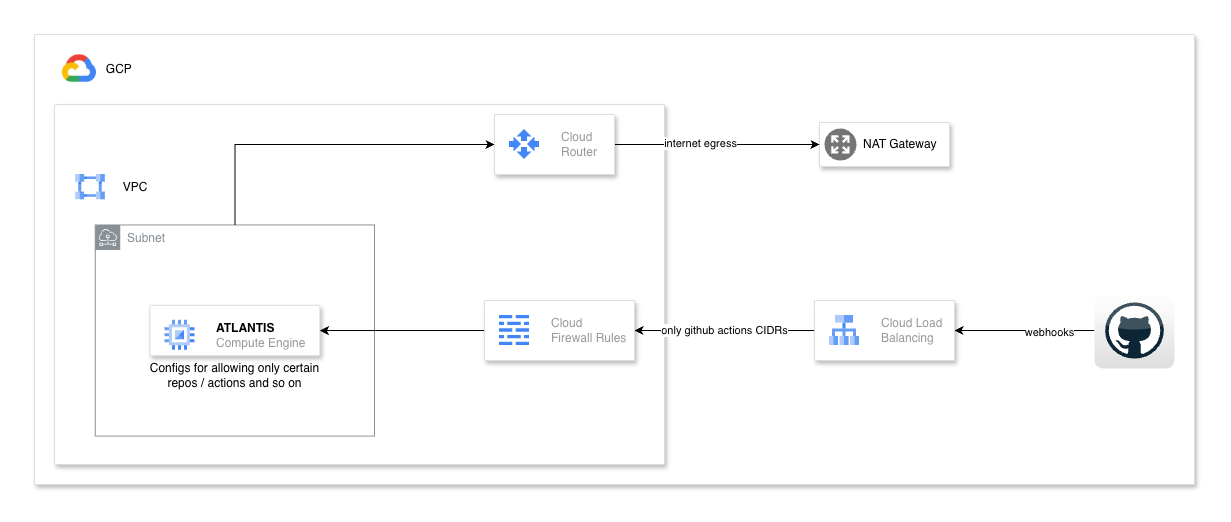
The main architecture looks like this:
I’ll be using opentofu, the open-source alternative to Terraform (though it is itself open source).
The atlantis VM is secured with firewall rules, placed behind an instance group and load balancer, so we can even have a high-availability (HA) setup for the instance. It won’t be active-active, however, as state files don’t support that degree of concurrency, nor do Atlantis’s internal locks.
The instance will have egress/internet connectivity only through the NAT gateway, with no external IPs or direct exposure on the VM.
The complete setup is available in this public GitHub repository for part 1, with additional instructions on the configuration.
The second part will focus on the configuration for the application infrastructure—how to push PRs and have atlantis automatically plan and apply changes to those projects.
PS: I won’t be using any remote modules or versioning in these examples; they’ll remain as local modules within the repositories I’m working on. However, best practice is to use versioned modules in separate repositories for better control and to track versions, which provides anyone using those modules with a clear migration path and ability to revert if needed.